Create Datastore
This guide provides step-by-step instructions to create and configure a datastore within your project.
Steps to Create a Datastore
-
Navigate to the Project Dashboard and click on Infrastructure.
-
In the Infrastructure dashboard, click *configurations in the side panel.
-
Click Create Configuration

Configuration creation interface
-
In the Create Configuration dashboard, click Add Component.
-
In the component selection menu, select Database.
-
Fill in the following details for your database:
Name Provide a name for your database.
Type Select the type of database, e.g MySQL
Version Choose the version of the database you want to use.
-
Select the Metrics you want to collect for the database.
-
Enter any required Environment Variables.
Note: These variables can help customize or connect the database with other components.
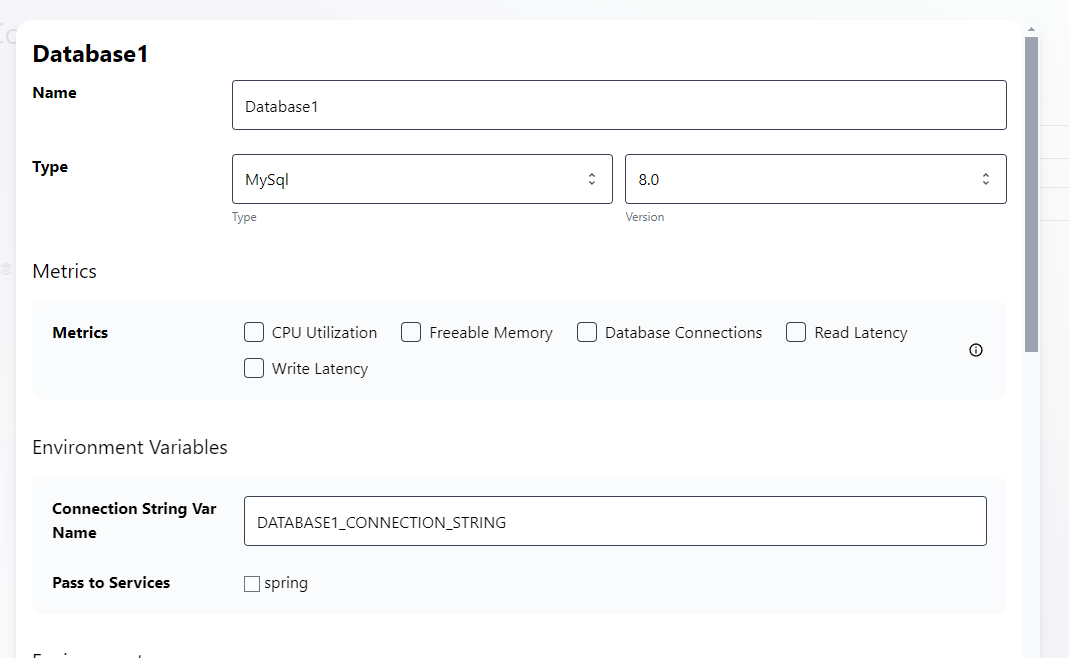
Additional database configuration settings -
Click Done to save your changes.
-
To finalize your datastore setup, click Create
Additional Resources
⭐ StationOps Architect
For more information on how to create datastores see the StationOps Architect guide